logo
Courses
    logo
  • Courses
  • Corporate Training
  • Testimonials
logo

Address

Suite 610 - The Business Center, Opp to Burjuman Centre, Adjacent to Burjuman Metro Station Exit 4, Khalid Bin Walid Street. P.O.Box: 94743 Dubai, UAE

Categories

  • Human Resources
  • Finance & Accounting
  • Project Management
  • Logistics & Supply Chain
  • Data & Business Intelligence

Quick Links

  • About Us
  • Blog
  • Corporate Training
  • Contact Us
  • LP Talks
  • Student Login
  • Privacy Policy
  • Terms and Conditions
  • Refund Policy
  • Pay Now

Contact us

  • info@learnerspoint.org
  • +971 (04) 4038000
  • 800SKILL(75455)
  • +1 347 637 6133
  • +44 20 4524 4199
  • +966112036111
  • +91 97462 22034
  • +971566335515

Stay connected

Privacy Policy

Tableau Desktop - Part 1 (Second Edition) (v1.0) Certification

24 hours of in-depth training

9 latest course modules on industry standards

Introduction to Tableau's data blending capabilities

Learn to connect, import, and manage data efficiently

Online & classroom learning modes

Choose from weekday or weekend classes

Pay with easy instalments

4.8/5

4500 Enrolled

Overview

What you will learn:

  • Gain an introduction to Tableau Desktop software
  • Tableau Desktop Part 1 Course helps to connect to various data sources
  • Create and format basic visualisations
  • Understanding and creating data dashboards
  • Implement interactive features in dashboards
  • Sharing and publishing Tableau workbooks
  • Mastering Tableau worksheet organisation techniques

Learning objectives

Upon finishing the training, professionals will master:

  • 1

    Discover how to connect to various data sources and import data into Tableau

  • 2

    Realise how to use Tableau's features and charts to create personalised visualisations

  • 3

    Develop the ability to sort and group data based on various criteria to gain insights from it

  • 4

    Know how to filter data to isolate specific data points of interest

  • 5

    Learn how to make interactive dashboards that provide quick data insights

  • 6

    Uncover how to save and share Tableau workbooks so that others can view and interact with their data visualisations

  • objective-image

    Ready to get started?

  • Overall ratings by our students

    Upcoming sessions

    Our Trainers

    We, at Learners Point, take immense pride in our teaching methods and instructors. Our instructors are some of the best experts in their fields and employ a practical approach to learning. Many of them are globally recognised and have a diverse set of experience in their field of expertise. You are always sure to have the best in the industry as your teachers who are ready to guide you at every step and make the experience informative yet enjoyable. Apart from the focus on learning your chosen course, our instructors also encourage students to develop communication skills and interpersonal skills necessary to excel in the practical world.

    Our cutting edge teaching methods make every program an immersive and productive experience for the learners. Our learning methods are research-driven and are continuously updated to stay relevant to present times as well as the future. You will enjoy practical applications of everything learned through theory and regular mock examinations to help monitor your progress. Our courses are led by an instructor in a classroom setup and we do offer online high-quality sessions as well for individuals. We also monitor the training sessions with a progress tracker to maintain high standards of instruction and ethics.

    Our Trainers

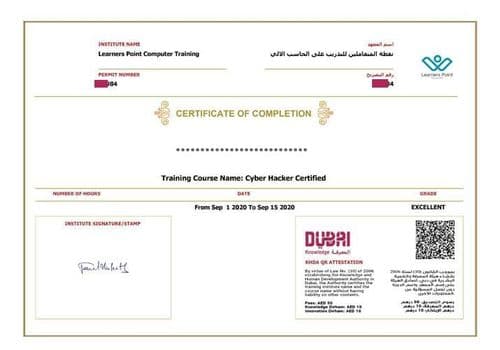
    KHDA Certificate

    Earn a KHDA attested Course Certificate. The Knowledge and Human Development Authority (KHDA) is the educational quality assurance and regulatory authority of the Government of Dubai, United Arab Emirates.

    Certifcate-Image0

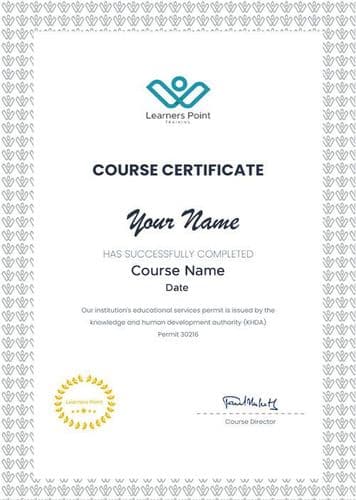
    Learners Point Certificate

    Earn a Course Completion Certificate, an official Learners Point credential that confirms that you have successfully completed a course with us.

    Certifcate-Image1

    Related courses

    Curriculum

    • Overview of Tableau
    • Navigate and Configure Tableau
    • Connect to Data
    • Build a Data Model
    • Save Workbook Files
    • Prepare Data for Analysis
    • Create Views
    • Customise Data in Visualizations
    • Adjust Fields
    • Sort Data
    • Group Data
    • Save Data Sources
    • Publish Data Sources and Visualizations
    • Share Workbooks for Collaboration
    • Configure Worksheet Filters
    • Apply Advanced Filter Options
    • Create Interactive Filters
    • Format and Annotate Views
    • Emphasise Data in Visualizations
    • Create Animated Workbooks
    • Best Practices for Visual Design
    • Create Dashboards
    • Enhance Dashboards with Actions
    • Create Mobile Dashboards
    • Create Stories
    • Enhance Stories with Tooltips

    Frequently asked questions

    The Tableau Desktop Part 1 certification is an introductory program that builds the groundwork for the Tableau Desktop Specialist exam. It guides learners in using Tableau Desktop to connect with different data sources, design charts and dashboards, apply filters, and create meaningful data stories. These skills help professionals turn information into insights and make smarter business decisions.

    Completing Tableau training can give freshers a strong start in their careers. Success, however, depends on more than just certification. Employers look for practical skills, the ability to build clear dashboards, and proof of real-world application. Creating a portfolio of projects, networking, and tailoring applications to roles like Data Analyst or Business Intelligence Analyst can greatly improve job prospects.

    Completing the Tableau Training can enhance your professional profile by providing you with the skills and knowledge required to effectively use Tableau Desktop. It demonstrates your knowledge of the software, making you stand out to potential employers and expanding your job opportunities in the fields of business intelligence and data visualisation.

    Attending the Tableau Desktop - Part 1 can help individuals gain a thorough understanding of the software's basic functionality and features. It enables them to create interactive data visualisations and dashboards, effectively analyse and present data, and make data-driven decisions. This course can also help participants prepare for the Tableau Desktop certification exam, increasing their chances of success in the global job market.

    The Tableau Desktop - Part 1 course is for individuals who seek to master the use of Tableau Desktop to create powerful data visualisations and conduct data analysis. This course is appropriate for both novice and experienced data analysts, business analysts, and data scientists who want to improve their Tableau skills.

    Tableau is a powerful tool that helps users connect to data, visualize it, and share insights for better decision-making. With its simple drag-and-drop features, it turns raw information into interactive dashboards and reports.

    This makes it easier to spot patterns, highlight unusual results, and understand business performance—without the need for coding. Tableau is widely used as a business intelligence solution, enabling both professionals and organizations to work in a more data-driven way.

    Do you want to learn more about Learners Point Academy?

    • Learn more about courses
    • Understand about our methodology
    • Let’s talk about Corporate trainings
    • Anything else that you want to know, we are here for you!

    Let's chat!

    • Afghanistan+93
    • Albania+355
    • Algeria+213
    • Andorra+376
    • Angola+244
    • Antigua and Barbuda+1268
    • Argentina+54
    • Armenia+374
    • Aruba+297
    • Australia+61
    • Austria+43
    • Azerbaijan+994
    • Bahamas+1242
    • Bahrain+973
    • Bangladesh+880
    • Barbados+1246
    • Belarus+375
    • Belgium+32
    • Belize+501
    • Benin+229
    • Bhutan+975
    • Bolivia+591
    • Bosnia and Herzegovina+387
    • Botswana+267
    • Brazil+55
    • British Indian Ocean Territory+246
    • Brunei+673
    • Bulgaria+359
    • Burkina Faso+226
    • Burundi+257
    • Cambodia+855
    • Cameroon+237
    • Canada+1
    • Cape Verde+238
    • Caribbean Netherlands+599
    • Cayman Islands+1
    • Central African Republic+236
    • Chad+235
    • Chile+56
    • China+86
    • Colombia+57
    • Comoros+269
    • Congo+243
    • Congo+242
    • Costa Rica+506
    • Côte d'Ivoire+225
    • Croatia+385
    • Cuba+53
    • Curaçao+599
    • Cyprus+357
    • Czech Republic+420
    • Denmark+45
    • Djibouti+253
    • Dominica+1767
    • Dominican Republic+1
    • Ecuador+593
    • Egypt+20
    • El Salvador+503
    • Equatorial Guinea+240
    • Eritrea+291
    • Estonia+372
    • Ethiopia+251
    • Fiji+679
    • Finland+358
    • France+33
    • French Guiana+594
    • French Polynesia+689
    • Gabon+241
    • Gambia+220
    • Georgia+995
    • Germany+49
    • Ghana+233
    • Greece+30
    • Greenland+299
    • Grenada+1473
    • Guadeloupe+590
    • Guam+1671
    • Guatemala+502
    • Guinea+224
    • Guinea-Bissau+245
    • Guyana+592
    • Haiti+509
    • Honduras+504
    • Hong Kong+852
    • Hungary+36
    • Iceland+354
    • India+91
    • Indonesia+62
    • Iran+98
    • Iraq+964
    • Ireland+353
    • Israel+972
    • Italy+39
    • Jamaica+1876
    • Japan+81
    • Jordan+962
    • Kazakhstan+7
    • Kenya+254
    • Kiribati+686
    • Kosovo+383
    • Kuwait+965
    • Kyrgyzstan+996
    • Laos+856
    • Latvia+371
    • Lebanon+961
    • Lesotho+266
    • Liberia+231
    • Libya+218
    • Liechtenstein+423
    • Lithuania+370
    • Luxembourg+352
    • Macau+853
    • Macedonia+389
    • Madagascar+261
    • Malawi+265
    • Malaysia+60
    • Maldives+960
    • Mali+223
    • Malta+356
    • Marshall Islands+692
    • Martinique+596
    • Mauritania+222
    • Mauritius+230
    • Mexico+52
    • Micronesia+691
    • Moldova+373
    • Monaco+377
    • Mongolia+976
    • Montenegro+382
    • Morocco+212
    • Mozambique+258
    • Myanmar+95
    • Namibia+264
    • Nauru+674
    • Nepal+977
    • Netherlands+31
    • New Caledonia+687
    • New Zealand+64
    • Nicaragua+505
    • Niger+227
    • Nigeria+234
    • North Korea+850
    • Norway+47
    • Oman+968
    • Pakistan+92
    • Palau+680
    • Palestine+970
    • Panama+507
    • Papua New Guinea+675
    • Paraguay+595
    • Peru+51
    • Philippines+63
    • Poland+48
    • Portugal+351
    • Puerto Rico+1
    • Qatar+974
    • Réunion+262
    • Romania+40
    • Russia+7
    • Rwanda+250
    • Saint Kitts and Nevis+1869
    • Saint Lucia+1758
    • Saint Vincent and the Grenadines+1784
    • Samoa+685
    • San Marino+378
    • São Tomé and Príncipe+239
    • Saudi Arabia+966
    • Senegal+221
    • Serbia+381
    • Seychelles+248
    • Sierra Leone+232
    • Singapore+65
    • Slovakia+421
    • Slovenia+386
    • Solomon Islands+677
    • Somalia+252
    • South Africa+27
    • South Korea+82
    • South Sudan+211
    • Spain+34
    • Sri Lanka+94
    • Sudan+249
    • Suriname+597
    • Swaziland+268
    • Sweden+46
    • Switzerland+41
    • Syria+963
    • Taiwan+886
    • Tajikistan+992
    • Tanzania+255
    • Thailand+66
    • Timor-Leste+670
    • Togo+228
    • Tonga+676
    • Trinidad and Tobago+1868
    • Tunisia+216
    • Turkey+90
    • Turkmenistan+993
    • Tuvalu+688
    • Uganda+256
    • Ukraine+380
    • United Arab Emirates+971
    • United Kingdom+44
    • United States+1
    • Uruguay+598
    • Uzbekistan+998
    • Vanuatu+678
    • Vatican City+39
    • Venezuela+58
    • Vietnam+84
    • Yemen+967
    • Zambia+260
    • Zimbabwe+263

    Learn now, pay later

    Dive into your course now and pay in installments